


Phone-light lunch ritual
Plan a phone-light lunch break with Apple Watch, AirPods, downloaded music, and a clear return time while your phone stays put away.

Before a 30- to 45-minute lunch break, choose one album or playlist, prepare Apple Watch and AirPods, and set a return time. Keep the phone in a bag or nearby as needed, and stop listening when lunch ends.
Lunch can disappear into tiny phone checks. One message leads to a headline. A headline opens a feed. The break becomes a series of unfinished visits, and music stays in the background.
The calendar already offers a cleaner structure. Lunch has a beginning, an approximate length, and a reason to stop. Give that boundary to one piece of music and the session becomes easier to imagine: choose, prepare, play, return.
In a May–June 2026 survey, Pew Research Center reported that 53% of U.S. adults said they spent too much time on their smartphone, while 45% said they had tried to cut back during the prior year.
Let lunch do the limiting
A broad promise to use the phone less can be difficult to act on because the boundary is vague. Lunch is specific. You know where it sits in the day, how long it usually lasts, and what must happen afterward.
Start with the return time. If lunch runs from 12:15 to 1:00, choose a session that can finish by 12:55. The five-minute margin absorbs a slow start, an interrupted track, or the walk back. A natural ending feels better than watching the final song lose a race with the clock.
This is a listening session inside a normal workday. Preserve the access your responsibilities require. If a workplace, family situation, health need, or emergency plan calls for the phone, keep it with you. “Phone-light” can mean zipped away and deliberately untouched.
Choose the music before hunger arrives
Make the selection in the morning. Lunch is a poor time to browse because appetite, messages, and the clock are already competing. Pick one 30- to 45-minute album or build a playlist with a clear ending.
Match the selection to the setting. A crowded café may suit a familiar record that does not require close attention. A quiet bench may make room for something new. A short walk and meal may call for two connected halves: side A on the way out, side B while returning.
Prepare Apple Watch and AirPods earlier
Apple’s current Apple Watch music guide explains how albums and playlists can be added and downloaded. If the lunch session needs to work away from the paired iPhone or outside reliable connectivity, complete the download to the Watch in advance. App, subscription, storage, software, region, and device requirements apply.
AirPods can connect directly to Apple Watch with compatible hardware and current software. Test the exact combination before lunch: play, pause, resume, and move between several tracks while the iPhone is unavailable. A three-minute morning check prevents the lunch break from becoming support time.
Connected playback can also work under the exact Watch model, Wi-Fi or cellular plan, coverage, app, subscription, setup, and regional conditions. Decide whether the session depends on a connection. Keep the downloaded and connected states clear.
A 30–45 minute lunch plan
| Time | Action | Boundary |
|---|---|---|
| Before lunch | Finish the download, connect AirPods, and choose the return time. | No library browsing once the break begins. |
| Minute 0–5 | Leave the desk, settle into the route or place, and start the chosen record. | The phone remains in its planned location. |
| Minute 5–35 | Eat, sit, or take a short walk while the session continues. | Use the Watch for playback and the visible time. |
| Final 5–10 | Let the record end or stop at the preselected final track. | Begin the return with enough margin. |
| After | Write one line about what should play next time. | Save further browsing for a separate moment. |
Give the phone a practical place
The phone can remain on the desk when your exact setup, route, and responsibilities allow it. It can also travel in a zipped bag, a coat pocket, or another place that keeps it available without making it the first object in hand.
If you leave it behind, verify the Watch setup for the session. Apple’s phone-away guidance says downloaded audio can remain available, while connected functions vary with model, network, cellular plan, coverage, setup, app, subscription, and region. Keep emergency and workplace needs ahead of the ritual.

End deliberately
Check the time between tracks near the end. Finish the record when the schedule allows, or stop at the final track you chose before lunch. A deliberate stop protects the rest of the day and gives the next session a natural starting point.
Make the session visible in your hand
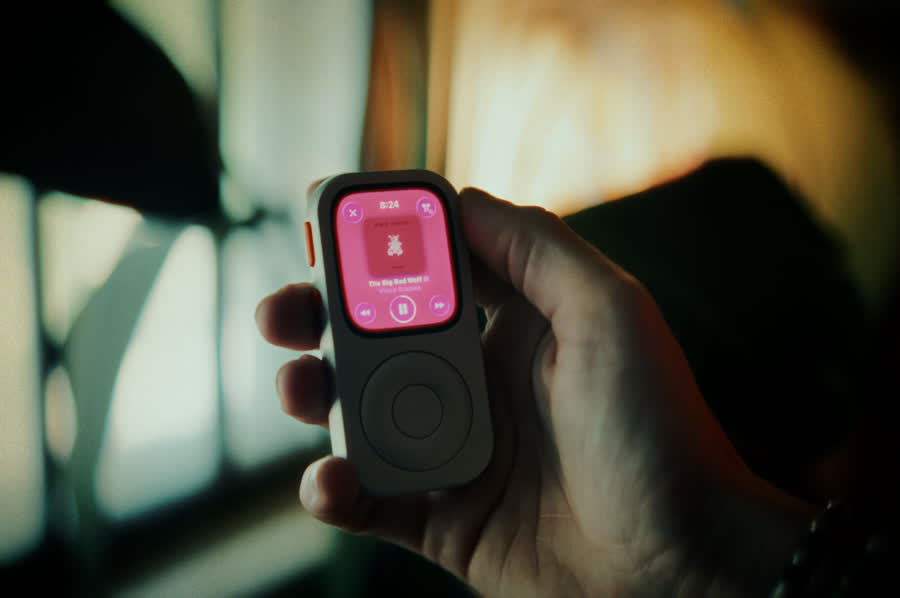
Techpod RePod gives a listed compatible Apple Watch a handheld form for the lunch playlist you prepared. Keep it beside the headphones so the music is ready when the break starts.
Confirm the exact Apple Watch generation and case size in the current RePod selector. It gives the prepared Watch a pocket music role you can choose to use.
Prepare the session in five minutes
Use the Apple Watch music preflight for the download, AirPods, battery, and phone-away checks. For a full album ritual beyond lunch, read One Album, Front to Back.
Phone-light lunch FAQ
How long should a phone-light lunch listening session be?
Choose a 30- to 45-minute album or playlist that leaves enough time to return without rushing. Set the return time first, then match the music to the available window.
Do I have to leave my phone behind?
No. The phone can stay in a bag or remain nearby as a practical fallback. Leaving it behind requires a tested offline or connected setup for the exact Watch, plus a route and responsibility set that make the choice appropriate.
Can Apple Watch play downloaded music away from iPhone?
Yes, when the audio has finished downloading to Apple Watch. App, subscription, storage, software, region, and device requirements apply. Connected functions have additional network and model conditions.
Does RePod reduce screen time?
RePod makes no screen-time outcome claim. It gives a compatible Apple Watch a handheld form that can act as a physical cue for a prepared listening routine.
Sources
Read the supporting details
-
Pew Research Center — U.S. smartphone-use survey
May–June 2026 attitudes among surveyed U.S. adults. -
Apple Support — Add music to Apple Watch
Current album, playlist, and download guidance. -
Apple Support — Pair AirPods with an Apple device
AirPods pairing and compatibility guidance. -
Apple Support — Use Apple Watch without its paired iPhone
Downloaded audio and connection-dependent functions. -
Techpod — RePod C1
Current product form and compatibility selector.
Make the listening ritual tangible
Give a compatible Apple Watch a pocket music role.
Watch RePod demonstrations to see whether the handheld form suits your lunch setup.