


An Apple Watch iPod case gives a compatible Watch a handheld, music-player shape. With RePod, you bring the Watch; Techpod supplies the case and mechanical wheel. Before choosing one, check the Watch's exact generation and size, understand the controls, and try the music setup you want to carry.
Which setup fits your day?
| Your routine | Prepare on the Watch | What the case adds |
|---|---|---|
| An album beside your laptop | Play your chosen album through compatible headphones or a speaker. Try the music-player setup first. | A handheld object you can pick up between songs, with Crown-linked wheel control in supported apps. |
| Downloaded music on a short walk | Finish the downloads and test playback through your headphones away from the phone. App and subscription conditions apply. | A pocket-player form for the audio your Watch already holds. |
| Music plus calls or messages | Check your GPS or Cellular setup, network, service and paired-iPhone requirements. | A different way to carry the same Watch; connectivity still comes from the Watch and its services. |
What are you buying: a case or a music player?
RePod is a Techpod accessory for an Apple Watch you already own or buy separately. The Watch provides the display, battery, storage, apps and connections. RePod changes how you hold it and adds an external wheel that mechanically turns its Digital Crown.
Start by charging and unlocking the Watch. Open your music app, play something through your headphones, and check the touchscreen and Digital Crown. A case won't repair a tired battery or an unresponsive screen. Resolve those problems before spending money on an accessory.
Match the generation and the millimeters
Write down both details before shopping. “Series 8 / 45mm” is useful; “the larger Apple Watch” leaves too much room for error. The RePod size guide explains how to identify your Watch and match it to the current selector.
- A Series 8 / 45mm needs the RePod option labeled S7/S8/S9 · 45mm.
- An SE 2 / 40mm needs the option labeled S4/5/6/SE/SE2/SE3 · 40mm.
The same size number can appear on different case designs. The listed 42mm RePod is for Series 10/11; it doesn't establish a fit for an older 42mm Watch. Likewise, the listed 49mm option names Ultra 1/2/3. Ask Techpod about any generation missing from the selector before ordering.
For a gift, ask for the recipient's generation and case size. A photo of the screen or the size of a spare band is an unreliable shortcut. Recheck the selected version in the cart after choosing a finish.
Know what the wheel, center and screen do
The circular control is part of RePod's appeal, especially if you miss holding a small music device. Its operation is worth understanding before it arrives:
- Turn the outer wheel: it mechanically drives the Apple Watch Digital Crown. Scrolling and volume adjustment depend on the app and watchOS.
- Use the touchscreen: tap the Watch's on-screen controls to make selections or control playback.
- Leave the center as decoration: it isn't a working select or play/pause button.
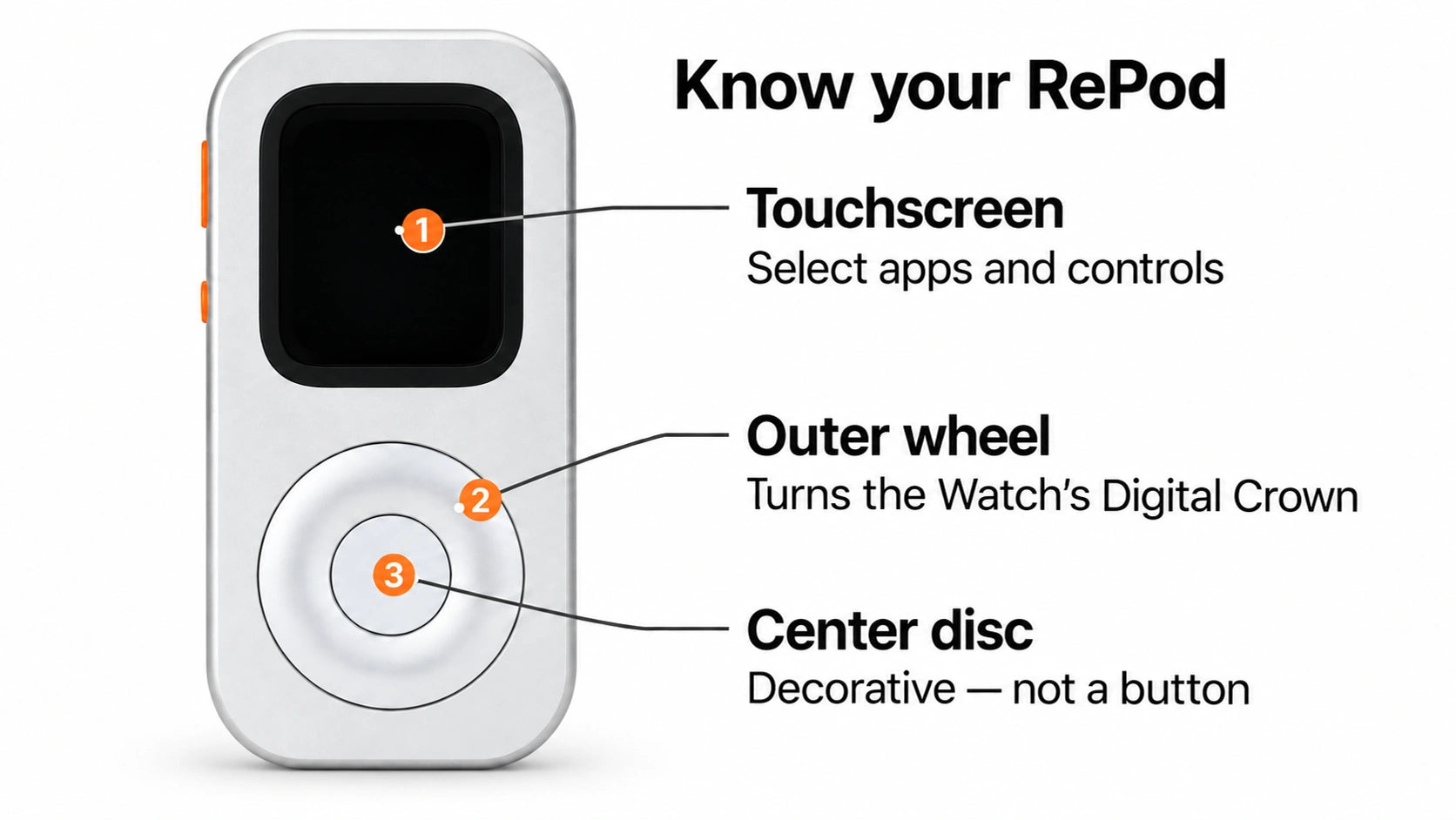
For an album session, you might choose the music on the screen and use the wheel for volume in a supported playback view. The RePod wheel guide explains the mechanism and controls in more detail. Match those actions to what you enjoy using; the familiar silhouette doesn't give it every control found on a classic iPod.
Try one album before planning a phone-light day
Choose something you genuinely want to hear and get it playing on the Watch first. For a walk without your iPhone, download the audio to the Watch using a supported app and connect compatible Bluetooth headphones. Content access and offline downloads can require a subscription.
Adding an album to your library is different from downloading it. Apple's music guide covers that distinction. Let the download finish, then check playback from the Watch before leaving. Keep the test small: one album, your usual headphones and a few minutes listening.
A GPS-only Watch can play eligible audio already downloaded to it. Streaming and other connected tasks need a suitable connection and service setup; Apple's guide to using Watch without a nearby iPhone explains those conditions. For a short departure checklist, use the Apple Watch music preflight.
Choose the version you want to carry
RePod C1 Classic 40–46mm versions use CNC-machined aluminum alloy. Choose it for a metal handheld body and a physical wheel around a Watch you already use for music; other versions need their own material check.
If you prefer wearing the Watch, keep that preference in the decision. If you're choosing a handheld case, the RePod and tinyPod comparison separates fit, material and wheel choices. Once you've chosen Techpod RePod, use the official buying and support routes to keep the seller and order details together.
Choose RePod if you want prepared Watch music in a metal handheld form with a mechanical Crown-linked wheel. Match your Watch and choose the case.
Common buying questions
Do I need cellular for downloaded music?
No. Eligible audio downloaded to the Watch can play offline, including on GPS-only models. Prepare the download and your compatible audio output first.
Can two Watches with the same size use one case?
Only if both generations are covered by that exact RePod version. Match generation and size together, including when moving a case to another Watch.