

Your newer Watch has taken the wrist. The older one still works, but wearing both makes little sense. RePod offers another way to carry it: an iPod-inspired handheld case around the Apple Watch you already own.
Can RePod work as a tiny phone?
A compatible Apple Watch inside RePod can handle supported calls, messages and music. RePod supplies the handheld form; the Watch supplies the screen, apps, battery and connectivity. What works away from your iPhone depends on the Watch model, pairing mode, network and service. You still need an iPhone for setup, and some functions continue to depend on it.
In Mac Sound Solutions inc.'s October 6 video, presenter Lance explores that idea with his cellular Apple Watch Series 7. He considers whether it could suit a family member, then tries the everyday functions that make a spare Watch worth keeping.
A call, without reaching for the big screen
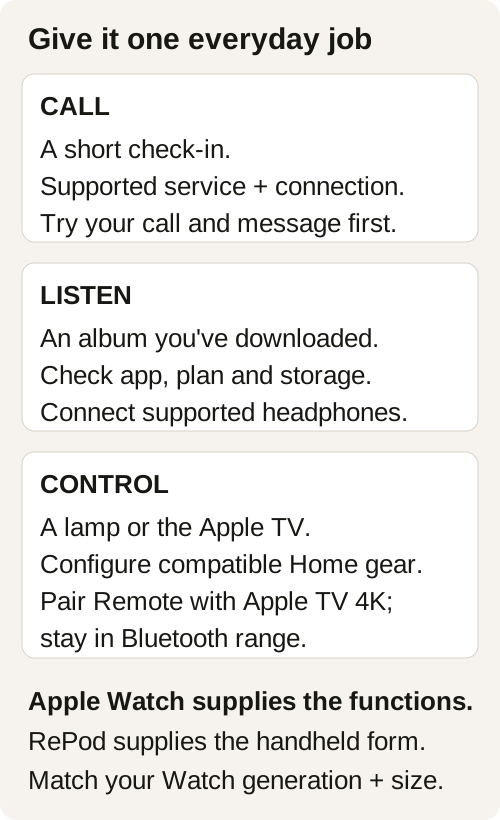
Think of the call you make while walking home: someone asks where to meet, you agree on a corner, and the conversation ends. A working cellular Watch can be useful for that short exchange when its plan and coverage support it.
At 2:38, Lance reports a call he made in the park the previous day using AirPods. It's a recognizable use for a Watch carried in the hand or pocket. Try the same task with your own Watch and headphones before depending on it away from your phone.
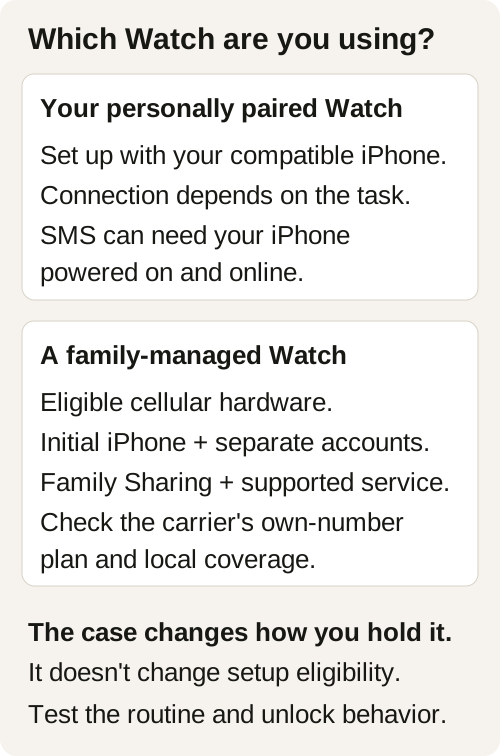
Calls and texts need separate checks. On a normally paired Watch, sending or receiving SMS/MMS can require the paired iPhone to remain powered on and online, even if it stays at home. A successful iMessage exchange doesn't settle the SMS question. Apple explains these connection limits; family-managed Watch plans have their own requirements.
A useful remote beside the sofa
An older Watch also has a place at home. Keep it where you sit, ready to use the controls you've already set up when you want to adjust the room.
Lance switches his studio lights off and on during the video. Apple's Home app on Watch can control compatible accessories and scenes, provided your home is already configured in Home. Access depends on your accessories, account permissions, software and connection. Apple's Home guide covers those controls.
For a television, check the device first. The Watch's Remote app can control a paired Apple TV 4K while it is awake and within Bluetooth range. Initial pairing also has setup requirements. Apple documents the pairing and Remote controls. This is a specific Apple TV use, so test your own setup before giving the Watch a permanent spot beside the sofa.
Could someone in the family use it?
Lance considered it for his daughter. Near the end of the video, he remains undecided after using RePod for only a few days.
A child or parent with a compatible iPhone can use ordinary Watch pairing with their own account. A family member without an iPhone needs a supported family-managed route with an eligible cellular Watch. Apple Watch For Your Kids has its own account, software and feature requirements.
For a US carrier example, US Mobile offers a Standalone Watch plan with its own number on Warp. Initial setup still needs a compatible iPhone, separate Apple Accounts, two-factor authentication and the required Family Sharing role. Confirm the exact device and current activation conditions with the provider. The case doesn't change eligibility or supply a plan.
Before giving one away, use our family Watch handoff guide. Ask the recipient whether they want it, then test the contact method they expect to use.
Give the old Watch one job first
If you're keeping it, start with music. Choose an album, download it to your personally paired Watch and connect supported headphones. Confirm it plays away from the iPhone. Offline listening depends on completed downloads, storage and the app or subscription you use.
There's a practical detail to try before settling into handheld use: with Wrist Detection enabled, Apple Watch automatically locks when you aren't wearing it. You may need to enter its passcode when picking it up. Apple explains automatic locking. Keep your security settings intact while checking whether the routine suits you.
Use the old Watch for the length of your intended walk or evening, and check its remaining charge.
RePod makes that Watch a handheld object you can pick up for a specific task. If you want your spare Watch to become a music companion or a small carry for supported calls, match its exact generation and case size to the current RePod options first. Apple Watch is sold separately.
RePod and Apple Watch: common questions
Do I still need an iPhone?
Yes, for setup. Some later tasks work away from it under the Watch's network and service conditions; others still depend on the paired iPhone. Check the task and pairing mode you're planning to use.
Can a GPS-only Watch serve a family member without an iPhone?
It doesn't meet the cellular hardware requirement for Apple Watch For Your Kids. A GPS model can still be paired normally with its user's own compatible iPhone.
Does RePod make the Watch a remote for any television?
No. The Apple TV example uses the Watch's Remote app with a supported, paired Apple TV 4K. Other devices require their own compatible apps or accessories. RePod supplies the physical case.
Sources and further reading
- Mac Sound Solutions inc.: RePod: A Mini iPhone for Kids & Grandparents?
- Apple: Use your Watch without a nearby iPhone
- Apple: Control your home with Apple Watch
- Apple: Control Apple TV 4K with Apple Watch
- Apple: Wake and unlock your Watch
- Apple: Set up a Watch for a family member
- US Mobile: Apple Watch Companion and Standalone plans