

A message after practice. A call when the pickup time changes. If you've upgraded your Apple Watch, giving the old one to your child sounds like a useful way to keep in touch. Check the setup first, before it becomes a gift they can't use.
Can you give an old Apple Watch to a child?
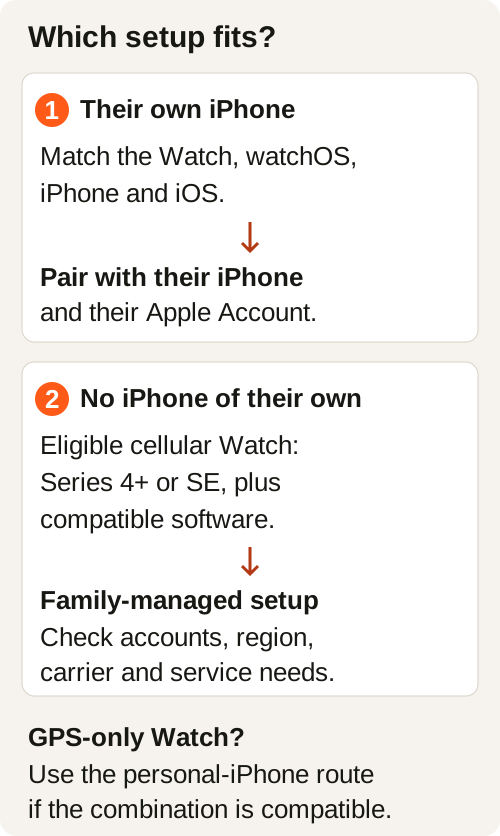
Yes, if the Watch supports the setup your child needs. A child with their own compatible iPhone can pair it normally. Without their own iPhone, they'll need an eligible cellular Apple Watch and Apple Watch For Your Kids, previously called Family Setup. A GPS-only Watch cannot use that family-managed route. Accounts, software and service support also matter. Apple explains the family setup requirements.
1. Does your child have their own compatible iPhone?
If they do, check the combination of Watch model, installed watchOS, iPhone model and iOS against Apple's compatibility table. A Watch that worked with your phone may require different software from the phone your child owns.
This route uses your child's iPhone and Apple Account. If they don't have an iPhone, your phone can manage an eligible family Watch instead. Check that route's requirements before erasing anything.
2. Is your old Watch GPS or GPS + Cellular?
Find the exact model in the Watch app on your paired iPhone: My Watch → General → About → Model Number. Tap the field to reveal the model number beginning with “A,” then match it to Apple's model directory.
Apple's family-managed route requires a Series 4 or later with cellular, or an Apple Watch SE with cellular. Compatible software is also required. An older GPS-only model may still suit a child who owns a compatible iPhone.
3. Will calls and texts work where they'll use it?
A Watch working on home Wi-Fi doesn't prove it will send a message outside school. For a child without an iPhone, check Apple's dedicated Apple Watch For Your Kids carrier list and ask the provider about the exact Watch model and family plan. General Apple Watch cellular support alone is insufficient.
A cellular plan is optional during family setup, though some functions need one. Providers such as BetterRoaming offer a separate family Watch number and plan; an iPhone is still needed for initial setup and management. Confirm coverage and the ongoing cost before committing.
Choose the route, then prepare the handoff
For personal pairing, set up the erased Watch with your child's compatible iPhone. For family management, open the Watch app on your iPhone, select All Watches → Add Watch → Set Up for a Family Member, and follow Apple's prompts.
Family setup needs separate Apple Accounts for you and your child, Family Sharing, two-factor authentication on your account, and an organizer or parent/guardian role. Review shared contacts and management choices together. Your personal account should stay yours.
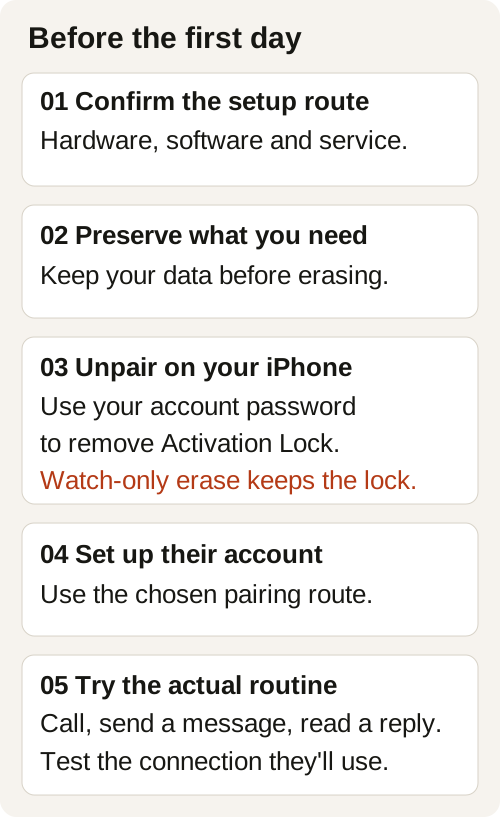
Once you've decided to give the Watch away, preserve any data you need and unpair it through your old paired iPhone. Enter your own Apple Account password when prompted to remove Activation Lock. Erasing only on the Watch leaves Activation Lock enabled. Keep your password private, and ask the carrier separately about cancelling or transferring the old subscription. Apple's unpairing guide covers both methods.
Practice the pickup message before the first day
Let your child find your contact and complete these three checks:
- Call: Make a call to you and answer your return call.
- Send: Send a short message such as “Practice is finished.”
- Receive: Read your reply and send an answer.
Test the message service you expect to use. An iMessage exchange doesn't confirm SMS will work. Verizon lists different requirements for Number Share and Standalone Watches. On a normally paired Watch, SMS can require the child's paired iPhone to stay powered on and online even when it isn't nearby. Family-managed plans follow their provider's requirements.
Repeat the checks with the connection your child expects to have, in a place they'll use it. Agree on charging, school rules and whether they want to wear it. Family setup has feature limits too: Apple lists ordinary credit/debit-card Apple Pay and Shortcuts as unavailable in this mode.
If the Watch stays with you, give it a different job
Maybe the hardware doesn't match the family route. Maybe your child doesn't want a Watch. You can still keep a working, compatible model for your own music.
Download a chosen album to your personally paired Watch, connect supported headphones and confirm playback away from your iPhone. Downloads depend on the audio app, subscription and available storage. Apple documents downloaded audio among the functions available without a nearby iPhone.
RePod gives a listed compatible Watch an iPod-inspired handheld form, so your spare Watch can become the player you pick up for a walk or keep beside your desk. Apple Watch supplies the audio, apps, battery and connectivity. Check the exact Watch generation and case size against the RePod selector before choosing.
Old Apple Watch for a child: common questions
Can a GPS-only Apple Watch work for a child without an iPhone?
It doesn't meet Apple Watch For Your Kids' cellular hardware requirement. A GPS model can follow ordinary personal pairing when the child has a compatible iPhone.
Should I leave the Watch on my Apple Account?
Use your child's identity for their Watch. Family management lets your iPhone manage supported settings while the child has their own Apple Account. Before handoff, remove your content and Activation Lock.
Can we use Wi-Fi instead of a cellular plan?
Some connected functions can work on supported Wi-Fi, with service and setup conditions. Test calls, iMessage and SMS individually. A Wi-Fi-only test doesn't establish contact away from that network; confirm the needed plan with your provider.
For the wider handoff checklist, read giving an old Apple Watch to a family member. If you keep it, explore other useful jobs for an old Apple Watch.
Sources and further reading
- Apple: Set up Apple Watch for a family member
- Apple: Watch and iPhone compatibility
- Apple: Identify your Watch
- Apple: Cellular carriers and Apple Watch For Your Kids
- BetterRoaming: US family Watch plans
- Verizon: Number Share and Standalone capabilities
- Apple: Unpair and erase your Watch
- Apple: Use your Watch without a nearby iPhone